
There are about a thousand “best distro” lists out there, and they’re all crap. Your distro barely matters. As a security engineer I get asked this a ton, so here are the real differences between the distributions and how to go about actually picking one.
Watch the Video #
It’s Just a Few Families #
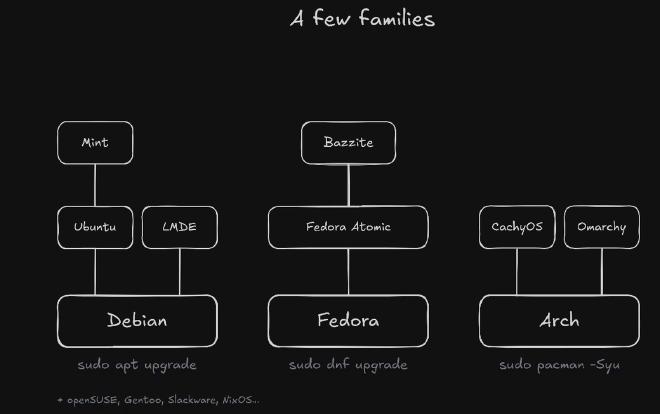
The famous Linux Distribution Timeline is crazy overwhelming at first glance. There’s about a billion distros on there. But look a little closer and they all stem from just a few. Take Debian: Ubuntu is built from Debian, and then you’ve got distros like Pop!_OS built on Ubuntu, which is built on Debian.
There are a couple of other trunks, like Slackware, SUSE and Red Hat. But almost everything you see on those best distro lists sits on one of three: Debian, Fedora or Arch. And the differences between those three are not nearly as much as you think.
| Family | Built on it |
|---|---|
| Debian | Ubuntu, Kubuntu, Linux Mint (on Ubuntu), LMDE, Pop!_OS (on Ubuntu) |
| Fedora | Fedora KDE, Fedora Atomic, Bazzite (on Fedora Atomic) |
| Arch | CachyOS, EndeavourOS, Omarchy, Manjaro (with its own, held-back repos) |
What Actually Changes: Two Things #
All that really changes between these is two things:
- How often they update. That’s how much they value stability versus new software.
- What command you type in the terminal to update them.
# Debian and Ubuntu
sudo apt update && sudo apt upgrade

# Fedora
sudo dnf upgrade

# Arch
sudo pacman -Syu
Those update the system’s packages. Flatpaks, snaps and AUR packages update separately.
There’s some other smaller stuff. Fedora uses SELinux out of the box, Debian and Ubuntu use AppArmor, and plain Arch doesn’t turn either one on. But even that’s just a default. Day to day, it’s those two things.
Stable or New: The Dial #
Put that first one on a dial: stable on one end, newest on the other.
Debian sits squarely in the stable camp. It changes slowly on purpose: you get one very scrutinized, tested set of packages, and it still gets security fixes.
Fedora sits in the middle. It ships a new tested release about every six months, so it moves faster than Debian, but you still get releases.
Arch sits way over on the newest end. Arch is rolling: no numbered releases, you just get the latest software soon after the developer puts it out.
The testing is the big difference. Debian’s testing is about the whole system working as a whole: packages only move toward a release once they work with the rest of it, then the whole set is frozen and stabilized together. That’s why it has releases. Arch tests packages in its testing repos too, just with no whole-release freeze.
Slow doesn’t mean broken and antiquated, and new doesn’t mean experimental and risky. You’re just trading newer features for fewer changes.
| Debian 13 | Ubuntu LTS | Fedora | Arch | |
|---|---|---|---|---|
| Releases | A new stable about every two years | Every two years (interim releases every six months) | About every six months | Rolling, no releases |
| Support | Full support to August 2028, LTS to June 2030 | Five years of standard support (26.04: to May 2031); interim releases nine months | About 13 months per release | Keep updating |
| Update | apt |
apt |
dnf |
pacman |
| Security default | AppArmor | AppArmor | SELinux, enforcing | Neither |
Sources: Debian 13, Debian LTS, Ubuntu releases, Fedora, Arch.
Same Driver, Different Age #
Here’s what that looks like in real life. Mesa is the open source graphics driver stack. On Debian it’s version 25; on Arch, version 26. Same project, just six feature releases ahead on Arch.
| Distro | Mesa package | Version (October 29, 2026) |
|---|---|---|
| Debian 13 | mesa-vulkan-drivers | 25.0.7 |
| Debian 13 backports | mesa-vulkan-drivers | 26.1.6 (amd64) |
| Arch | mesa | 26.2.6 |
So why do newer packages matter? They can bring fixes and support for newer hardware. It doesn’t automatically mean more FPS in games, but it can.
And it’s not even that simple, because even on Debian you can use backports: newer versions of selected packages, rebuilt for the stable release. There are backports for those Mesa Vulkan drivers that get you on version 26 on the same Debian 13. You opt in per package, and backports get best-effort support, less tested than Stable.
Enable the repository with this file, from Debian’s instructions, as /etc/apt/sources.list.d/debian-backports.sources:
Types: deb deb-src
URIs: http://deb.debian.org/debian
Suites: trixie-backports
Components: main
Enabled: yes
Signed-By: /usr/share/keyrings/debian-archive-keyring.gpg
Then install the newer package from it:
sudo apt update
sudo apt install -t trixie-backports mesa-vulkan-drivers
Everything Else Is a Flavor #
All the distros you see on top of the big three are just flavors. They’re somebody’s pre-customization of the base operating system: pre-packaged opinions. They’re not special, and they’re not doing anything drastically different.
Any Distro Can Look Like Any Other #
This is the part I really want to hammer home: you can make any one of these look like any other one. It’s one thing I didn’t get starting out either. I thought I had to go to Ubuntu to get GNOME, or Fedora to get KDE. You don’t. KDE and GNOME and any other desktop environment are just software, and you can install them on just about any distribution.
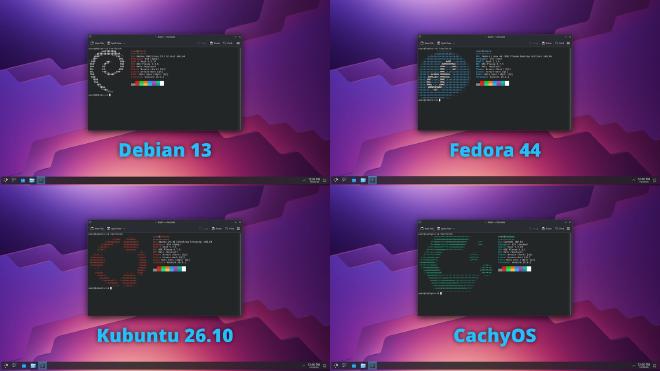
Even here you can see the dial: Debian’s Plasma is 6.3, Fedora’s and Kubuntu’s 6.7, and CachyOS’s 6.8.
Windows to Mac, very different. Even Windows 10 to 11 is pretty different. Linux distros, even the big three, are pretty much the same underneath, so everything kind of works on them.
Somebody Else Doing Your Upgrades #
A flavor is kind of like having somebody else make the upgrades to your PC versus doing it yourself. Nothing wrong with having somebody else do it, nothing wrong with doing it yourself. It’s whatever you want.
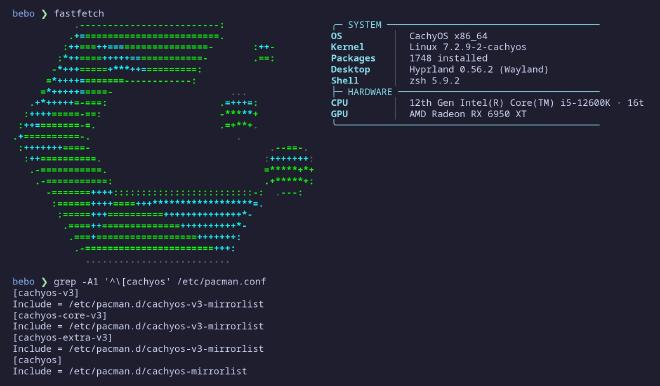
The big things that make CachyOS CachyOS, its optimized repos and kernels, you can add to regular Arch. They even have a script for it in their docs; it picks the optimized repos your CPU supports. And pretty much everything you do day to day on Ubuntu can be done on regular Debian. Ubuntu Pro, Livepatch and PPAs are the parts that don’t carry over.
Flavors Bring Opinions #
A flavor also brings its own opinions, and sometimes those are bad opinions. If you want Firefox on Ubuntu and you ask apt for it or go to the store, you get it as a snap. You can’t get it as a regular apt package without a workaround, Mozilla’s own APT repository.
I don’t like that. Snaps suck; they’re just a worse version of Flatpaks, and I shouldn’t be forced into one direction. But that’s the default they picked for you. You might not be as upset about it as me, but it’s a good example of the opinions behind these flavors.
To be fair, Ubuntu Server? Still great. I use it at work all the time. Ubuntu for the desktop? Meh. Not for me.
Mint goes the other way. It’s built on Ubuntu, but it blocks snaps out of the box, and it’s packaged really nicely for beginners looking to get into Linux. I love Mint. Current Mint is built on Ubuntu 24.04 LTS, and if you’d rather skip Ubuntu entirely, LMDE is Mint built straight on Debian.
The One Outlier: Immutable Desktops #
There’s one outlier to everything above: atomic desktops, or immutable desktops, as you might have heard them called. That’s things like Bazzite and Fedora Atomic, which Bazzite is built on.
On a normal distribution, your package manager changes actual system files one by one, right there on your running system, and you can change any of them yourself.
On an immutable distro like Bazzite, the core system is read-only, so you can’t change those files (/etc and /var are the exceptions and stay writable). Updates swap out the entire system image as a whole, in one breath, and it lands on your next reboot. But it also keeps the old one, so if an update ever goes bad, you can just roll back into it. Your apps live on top of that, in Flatpaks or containers, instead of in the system itself.
# Bazzite: update the system image, then reboot into it
# (the desktop images also update on their own)
ujust update

# Go back to the previous image, then reboot
rpm-ostree rollback
Here’s the trade:
Pros
- Way harder to mess up. You can’t modify system files, and you’re not meant to install software straight to it (layering packages exists, as a last resort), so it’s very resilient to you breaking it.
- It rolls back a bad update.
- The same system, every time.
- Flatpak apps are sandboxed, which is a big buff for privacy and security: an app can’t freely see other apps or poke at your underlying system. How much each one can see still depends on the permissions it asks for.
Cons, which are just the inverse of the pros:
- You can only modify your user folders (and
/etcand/var). That can be annoying. - Customizing the system itself is harder, because of that first one.
- A rollback goes back to the last system image, not your files, so it isn’t a backup.
How I’d Pick #
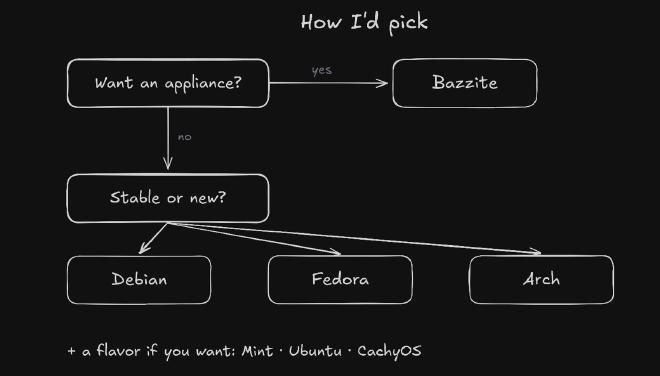
First split: do you just want an appliance? You want your machine to turn on and work, it’s hard to break, you’re not really interested in Linux, you just want to use it and play games. That’s Bazzite. Decision made.
If you want a true Linux experience, where you can tinker, modify your OS and actually change your files, pick one of the bases. Then you just decide stable or new:
- You want stability? Go Debian.
- You want the newest stuff, and you’re okay with the odd break here and there? Go Arch.
- Somewhere in between is Fedora.
Fedora’s a fine middle ground; it’s just not for me. In 2023 they proposed opt-out telemetry for Fedora Workstation, and that rubbed me the wrong way. That’s a big red flag. After the backlash it was withdrawn, so it never actually came out, and the opt-in version they proposed later got dropped too. But it’s still kind of a red flag.
Then put a flavor on top if you want one.
What I Run #
I’ve distro hopped. I was a big Fedora guy for a while, then I did Ubuntu for a while, and I did the whole Mint thing. I’ve been around the block. But ultimately I landed on Arch, just because I like having the newest stuff. (And I wanted to say I use Arch, by the way, obviously.) I’m okay if it breaks every once in a while, but really, it’s been pretty stable for me.
And I actually run a flavor on top of Arch called CachyOS, because I really like how it packages Arch up. It’s kind of like Arch without the headaches, and it brings some cool customizations, like its own Proton builds and kernels. You can flame me about it not really being Arch. But for me, I just like it.
The Short Version #
Your distro doesn’t really matter. They’re all really the same at the end of the day. Want an appliance? Bazzite. Otherwise, pick your spot on the dial, stable or newer packages, and put a flavor on top if you want one.