
About two months ago, I choked pretty hard alone at home. That shook me up, so I asked Claude what I could do about it when you’re alone, and then I called my girlfriend on Signal to tell her about it. No less than 30 minutes later, Facebook started serving me ads for anti-choking devices.
Signal is end-to-end encrypted, and Anthropic says it doesn’t sell any user data. So how did Facebook know? I honestly don’t know. But that’s when I started to dive into this whole privacy thing, with two goals:
- Give data brokers a lot less to work with. That’s privacy, not anonymity. I’m not hiding from anybody; obviously, I’m still putting my face on YouTube.
- Don’t ruin daily life. Good privacy while retaining usability.
Here’s everything I changed that was worth it, what each one doesn’t fix, and what I don’t think is worth it day to day.
Watch the Video #
The Short Version #
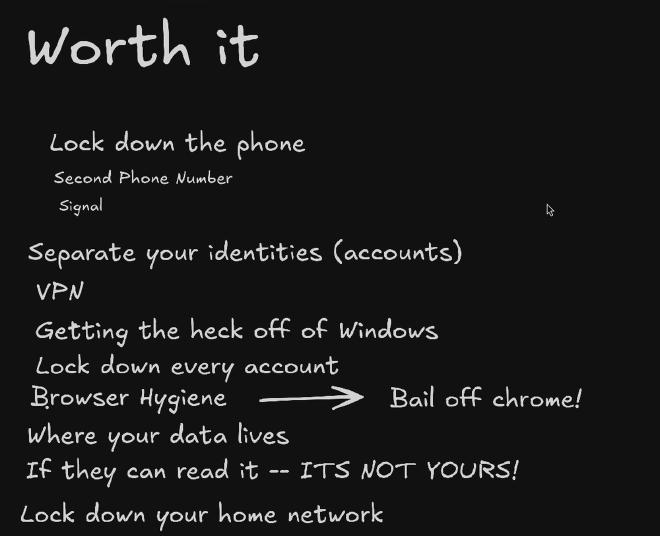
| Change | What it does | What it costs | What it doesn’t fix |
|---|---|---|---|
| Lock down the phone | No privileged Google or Facebook services; you decide which apps get the mic; no telemetry | A supported Pixel and an OS install | Your carrier still knows roughly where the phone is |
| A second number | A public number for stores and strangers, a private one for people you trust | About $5 a month | Whoever gets the public number can still sell it |
| Signal | End-to-end encrypted calls and messages | The other person has to be on it too | Normal calls and texts with everyone else |
| Separate your identities | A different email address for every account, so there’s no shared email to match on | Keeping track of aliases | Your real name and card still match |
| VPN | Your internet provider sees a tunnel; sites see the VPN’s IP | A subscription, and you trust the VPN instead | Logged-in accounts, your phone’s location |
| Get off Windows | No diagnostic data you can’t turn off, no ads in the Start menu | Learning Linux, or dual booting | Whatever you still do on the Windows side |
| Lock down every account | MFA without text codes; every privacy switch flipped | An afternoon | Whether they honor the switches |
| Browser hygiene | Real tracker blocking, fingerprinting protection, containers | Some sites break | Your IP; anything you’re logged into |
| Where your data lives | Nobody else holds the only copy, and the cloud drive is end-to-end encrypted | You’re responsible for the backups | Mail still passes through whoever runs your inbox |
| Lock down your home network | Smart devices and guests can’t reach your stuff; ad and tracker domains blocked | A router that does VLANs, plus a DNS filter | Devices can still listen or upload what they want |
1. Lock Down the Phone #
The phone is the single biggest target for information. It follows you around all day, it knows where you are, and your life is on that phone.
Your carrier knows where it is too, and for years carriers sold that. A reporter paid a bounty hunter $300 to find a phone with T-Mobile location data, and in 2024 the FCC fined AT&T, Verizon, T-Mobile and Sprint about $196 million for sharing customers’ location data without their consent. As long as your phone is on their network, there’s not a big way to stop that part. But there are things on the phone you can control.
On stock Android, Google Play services runs with special system privileges, and some Samsung phones shipped Facebook pre-installed: you could disable it, but you couldn’t delete it. In 2021, researchers left Samsung, Xiaomi, Huawei and Realme phones sitting idle, and they still sent data to their makers and to pre-installed Google, Microsoft and Facebook apps, with no way to opt out.
What I did: moved to GrapheneOS. I didn’t want anything to be able to hot mic me anymore, or anything running under the hood that I didn’t know about.
- Facebook doesn’t come pre-installed. I don’t put it on my phone at all anymore.
- Google Play, if you add it, runs just like a normal app without any special permissions.
- Apps only get the microphone if I allow it, and one switch turns it off for everything.
- No analytics or telemetry at all. To check for updates, all it gets is your phone model and OS version.
More in my GrapheneOS setup and its video.
2. A Second Number #
Your phone number is basically an ID card, and you hand it out everywhere. Every store and app that makes you put it in can match you up with it, pass it along and sell it, and that’s how you end up on all those scam call lists.
What I did: a cheap $5 eSIM from Tello, right next to my carrier line on the same phone. On Android, it’s pretty seamless.
- The public number is for online shopping, random people and sites that demand a phone number.
- The private number stays with only people I trust.
I found that to be so freaking handy. The hope is that my real number gets sold less, goes stale and falls off the lists.
3. Signal #
Normal phone calls and regular texts aren’t end-to-end encrypted, so your carrier can get them. By law, carriers have to build in a way to tap your calls when the police get a court order, and a door built for the police is still a door. In 2024, Chinese state hackers got into those wiretap systems at major US carriers, and the FBI and CISA told Americans to switch to encrypted apps like Signal.
What I did: Signal is my default for messages and calls. Everything’s end-to-end encrypted, always. When the government subpoenaed Signal, all it could hand over was the date an account was created and the last time it connected. That’s it.
The catch is the other person has to be on Signal too. But I’ve convinced pretty much everybody I talk to on a normal basis to switch.
SMS and MMS are never end-to-end encrypted. RCS chats can be: between Android users in Google Messages and, in a beta since iOS 26.5, between iPhone and Android on supported carriers. Look for the lock icon.
4. Separate Your Identities #
Most people use one email address for all their accounts and click sign in with Google or Facebook on everything. That email works just like a name tag: every company that has it can match it with what everyone else knows about you. And when you sign in with Google, the app gets your name, your email and your profile picture.
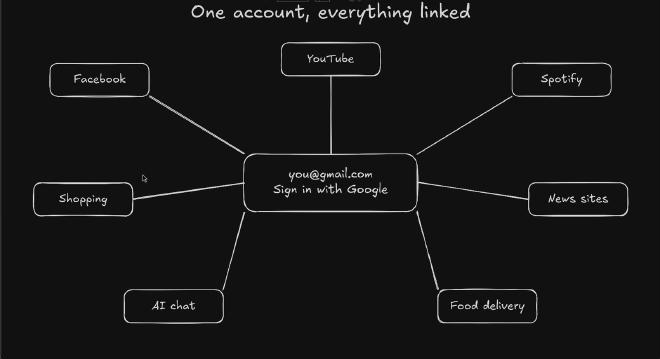
How much matching is really going on? In 2024, Consumer Reports had 709 people download the list of companies that sent Facebook data about them. On average, it was 2,230 companies. Some people had over 7,000. That’s ridiculous. And Facebook’s trackers follow you off-site: in 2022, The Markup found tax filing sites like H&R Block, TaxAct and TaxSlayer sending Facebook people’s financial information, like income and refund amounts.
What I did: split mine up. No more signing in with Google, Facebook or Microsoft.
- Every service gets its own account with its own email alias from Proton Pass, so there’s no email to match on.
- Work and personal never mix. Each lives in its own browser profile, and I never sign in to one from the other.
Is this perfect? Am I totally anonymized now? No. If I give a company my real name or my credit card, they can still match me. But I’ve taken away the easiest match they had, and I’m not handing it to them on a silver platter anymore.
Other alias services: Firefox Relay and SimpleLogin (which Proton owns). Any alias service still sees your mail; you’re picking who you trust with it.
5. VPN #
Without a VPN, your internet provider can see every site you visit, when and how often. They can’t see what you do on the page, but they can see where you went. In 2021, the FTC found the six biggest providers can see which websites you visit and where you are, and work closely with advertisers. In 2017, Congress threw out the rules that would have made them ask before using your browsing history for marketing. So now it’s open season.
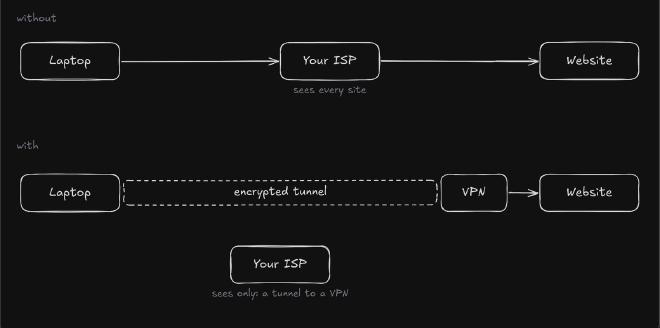
What I did: I run Proton VPN. My provider just sees an encrypted tunnel, and sites see the VPN’s IP instead of mine, so they can’t use it to see what city I’m in. An IP address is an identifier, just like an email or a phone number.
The catch: now the VPN company sees every site instead. You’re just picking who you trust with it. I picked Proton because they keep no logs of what you do, and they’ve had that checked by independent auditors five years in a row.
A VPN isn’t a magical fix-all, end-all, be-all. If you’re logged into accounts, they still know it’s you, and the carrier still has your location from the cell towers. But it’s a good step.
6. Get Off Windows #
It couldn’t be much more simple than that. Microsoft is watching everything you do, and it’s not even subtle about it. And these days, it’s a freaking vibe-coded buggy mess.
- Diagnostic data: on Windows Home and Pro, you can’t turn it off. Only Enterprise and Education get an off switch, and my bet is it still phones home.
- Ads: since 2024, in your Start menu, on the computer that you paid for.
- Recall, on Copilot+ PCs, screenshots your screen every few seconds. When Microsoft first showed it, a researcher found the text it read sitting in a database that wasn’t even encrypted. It shipped opt-in and encrypted in 2025, and Signal Desktop still blocks it from screenshotting your chats by default. Go Signal.
What I did: go Linux. If you can’t go full time, dual boot: keep Windows just for the things that need it, and run Linux day to day. On the Windows side, run Chris Titus’s WinUtil and turn off what it lets you. That’s a phenomenal tool.
Before dual booting, back up your BitLocker recovery key; changing partitions can ask for it. Before WinUtil, make a restore point: it runs a script straight from the internet as administrator, so read its docs first.
7. Lock Down Every Account #
Turn on multi-factor authentication everywhere you can, and don’t use codes by text message if you can avoid it, because of SIM swaps. A scammer calls your carrier pretending to be you, with everything they’ve amassed from your consumer profile, and gets your number moved to their SIM. Then every text, including your codes, goes to them. It even happened to the SEC in 2024: a guy with a fake ID walked into an AT&T store, took the number on the SEC’s own X account, and his partners posted a fake Bitcoin announcement. The SEC didn’t even have MFA turned on.
What I did: TL;DR, don’t use text codes. I use authenticator apps like Aegis or Proton Pass.
Your carrier has locks for this too. Turn them on for every line:
- T-Mobile: SIM Protection under Profile → Privacy and Notification, and Port Out Protection on each line’s add-ons in T-Life.
- Verizon: SIM Protection and Number Lock, under Security in My Verizon.
- AT&T: Wireless Account Lock, in the AT&T app.
Then, while you’re in your account settings, go to the privacy section and throw every privacy switch they’ll let you, for every app and service you use. Whether they honor it is a whole other question: in 2025, a jury found Google kept collecting data from about 98 million people after they turned activity tracking off, and awarded $425 million. Google’s appealing. It still doesn’t hurt. I went through Google, Spotify, ChatGPT, Claude and so on.
For AI chats, the switch that matters most is training on your conversations: ChatGPT under Settings → Data controls, Claude under Settings → Privacy. Turning it off doesn’t delete anything or stop all collection.
8. Browser Hygiene #
Chrome is made by Google, the biggest ad company there is. That alone should be a bit of a red flag. And Chrome only gets a weaker version of uBlock Origin now, the best ad and tracker blocker out there; Firefox still runs the full thing. So bail off Chrome.
What I did: LibreWolf, a locked-down Firefox fork. It:
- Blocks trackers, with uBlock Origin built right in.
- Wipes your cookies every time you close it. Honestly, I got kind of annoyed with that and turned it off.
- Fights fingerprinting, where a site recognizes your browser without cookies, from things like your screen size and fonts. It breaks fingerprinting so much that all my websites are in UTC now.
It does break some sites, so for work I fall back to a regular Firefox. Brave is cool too. Anything but Chrome.
I also use containers, each like a separate browser inside your browser with its own cookies and logins. Facebook and Google each get their own, so my logins with them don’t ride along to every other site. Containers don’t change your IP or your fingerprint, though.
9. Where Your Data Lives #
Your email, your files, your photos, even your DNA: whoever’s holding it can look at it.
- When 23andMe went bankrupt in 2025, millions of people’s genetic data was sold along with the company, for $305 million.
- Google paid $100 million to settle an Illinois lawsuit over recognizing faces in Google Photos without people’s consent. Shocker, right?
- In 2022, The New York Times reported on a dad whose photos of his toddler’s infection, taken for the doctor, got flagged by Google’s AI. Google shut down his whole account: his email, his photos, even his phone service. Police cleared him, and Google still wouldn’t give it back.
So here’s the rule: if they can read it, it’s not yours. If somebody else holds the only copy, and it’s not on your metal, it’s not your data.
What I did: moved all my stuff.
- Photos: a self-hosted Immich deployment.
- Files: mostly on my own NAS at home.
- Proton Drive, a little bit. It’s end-to-end encrypted, and everything I put there, I have another copy of at home.
- Mail: Proton Mail. My Gmail is more of a spam box and legacy stuff now.
The catch is that now you’re responsible for the backups and the data integrity. To me, it’s a price worth paying.
10. Lock Down Your Home Network #
Your smart TV, your speakers, your cameras: always on, and always phoning home. In 2025, Texas sued five of the biggest TV makers, alleging their TVs screenshot your screen as often as every half second to sell ads on what you watch. Samsung settled this year and agreed to ask Texans first, and LG settled in May.
What I did: my smart devices and my guests each get their own network, a VLAN, separate from my computers. They can’t talk to each other or to my main network. I can still reach them if I need to, but they can’t start a connection back.
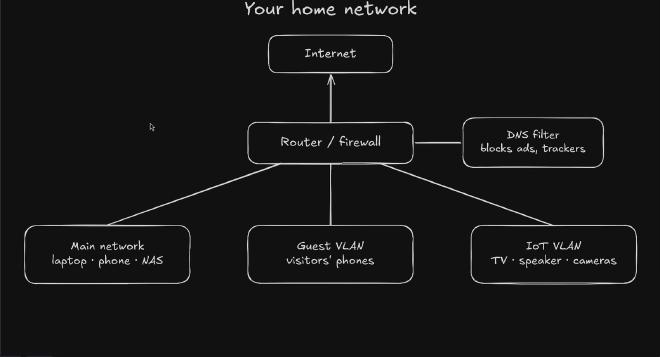
That doesn’t stop them listening, or sending whatever they want out to the internet. That’s where a DNS sinkhole helps: it refuses to look up known ad and tracker domains for everything on the network, even the TV. (Apps that bring their own DNS, like a browser with DNS over HTTPS, can get around it.)
More in What You Actually Need for a Secure Home Network and its video.
Not Worth It Day to Day #
Remember the two goals. A lot of the hardcore stuff people recommend is built for anonymity, or for even more privacy and security, and it breaks goal two. I haven’t run these day to day; here’s why I don’t think they fit.
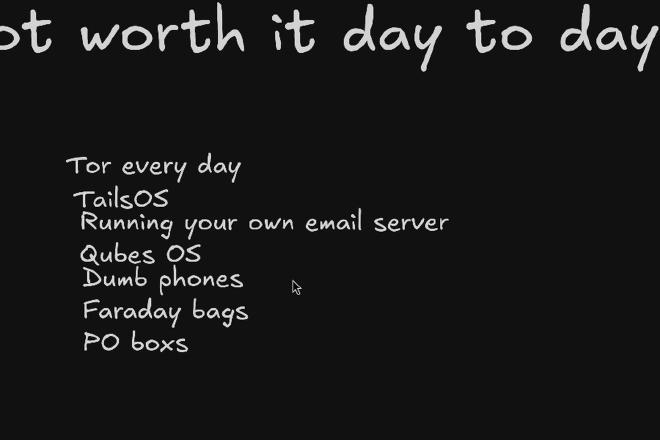
- Tor every day. Tor is awesome; I love it. But it’s slow, a lot of sites block the exit nodes, and the second you log into your own accounts, they know it’s you anyways.
- Tails. A whole operating system you boot off a USB stick. Everything goes through Tor by default, and it forgets everything when you shut down unless you set up its Persistent Storage. Pretty cool, but pretty annoying day to day.
- Your own email server. No single company holds your email. Awesome. But a lot of home internet providers block the port it needs, big providers often reject mail sent straight from home IP addresses, so you end up relaying through someone else anyway. And keeping it patched and not hacked is basically a part-time job.
- Qubes OS. You split your apps into separate virtual machines called qubes, so a bad app in one qube can’t see what’s in the others. Really cool, but it needs pretty decent hardware and it’s a steep learning curve. Flatpaks get you some of the way: they sandbox each app, but on a shared kernel and only as tightly as the permissions you allow.
- A Faraday bag, or turning your phone off every time you leave. It does stop the carrier getting your location. But now you don’t have a phone.
- Dumb phones. Cool, but the carrier still tracks your location through the cell towers, and you don’t have a smartphone anymore. I think GrapheneOS is a lot more elegant of a solution.
- PO boxes for everything. They keep your home address out of databases. Awesome. But every package, bill and form turns into paperwork, if they accept it at all, and you still have to go get it.
They all have a place, and I love a lot of what these things do. But day to day, for me and my goals, not worth it.
Going Further #
These didn’t make the video, but they’re worth it too.
Freeze Your Credit #
I froze mine at all three bureaus. A freeze is free by federal law, and most lenders can’t pull a frozen report to open an account in your name.
- Freeze all three: Equifax, Experian and TransUnion, each with a unique password and MFA. Don’t pay for a “credit lock”; the free freeze is the real thing.
- Applying for credit? Lift it temporarily at the bureau the lender uses, or all three if you don’t know.
- Kids: a parent can freeze a child’s file for free, under 16.
- Extra credit: Innovis, NCTUE for phone and utility accounts, and ChexSystems for bank accounts.
A freeze doesn’t touch your existing accounts or stop SIM swaps; that’s what the account and carrier locks are for.
Turn Off Your Carrier’s Ad Programs #
I haven’t done this one yet; it’s on my list. Carriers’ ad programs use your browsing, app usage and sometimes location, and the basic ones are on unless you turn them off:
- Verizon: in My Verizon → Privacy preferences, turn off Custom Experience and Custom Experience Plus, and opt out of Business and Marketing Insights.
- AT&T: at att.com/PrivacyChoices, turn off Personalized and Personalized Plus advertising and use Do Not Sell or Share; the CPNI opt-out is separate.
- T-Mobile: in the Privacy Dashboard, turn off Relevant Ads, Tailored Offers and Ads, and Analytics and Reporting.
- Tello: Do Not Sell or Share, in your account.
It doesn’t stop the carrier knowing where your phone is; it only limits what they do with it for marketing.
Run AI Locally #
I run local models too, and I’ve written about giving them web search. A model running on your own machine can keep your prompts and documents there, though connected tools like web search still send data out; Ollama and LM Studio are two common ways to run one. Your RAM and graphics card decide how big a model you can run, and both apps have cloud features now, so check what’s actually running locally.
On an iPhone #
I don’t use an iPhone, so these are researched, not from my own setup.
- Phone: a 2021 study found iPhones and Google’s own Pixels both sent data home while idle, even with analytics off. iOS has App Tracking Transparency, which limits tracking across other companies’ apps and sites (not Apple’s own collection), an orange dot when the mic is on (green when the camera’s on too), and Lockdown Mode for people targeted by spyware.
- Second number: iPhone 13 and later run two eSIMs at once, with one used for data at a time. A second carrier needs an unlocked phone.
- Aliases: iCloud+ has Hide My Email, and the free Sign in with Apple can hide your address from apps that support it.
- VPN: iCloud+ Private Relay isn’t a full VPN. It covers Safari, DNS lookups and unencrypted app traffic, keeps your general location, and isn’t available in every country.
- Browser: in the US, every iOS browser runs on Apple’s WebKit, so full uBlock Origin isn’t available. Safari content blockers like AdGuard, 1Blocker and Wipr do part of the job.
- Backups: standard iCloud backups use keys Apple holds. Advanced Data Protection end-to-end encrypts backups and Photos (not Mail, Contacts or Calendars), and it isn’t available to new users in the UK.
Where I Landed #
I can still use my phone and my computer like a normal person, but data brokers get a whole lot less information. It’s a win-win.
I still don’t really know how Facebook got that choking thing. I’ve got my ideas; I can’t prove anything. But now they’ve got a whole lot less to go on.