
Watch the Video #
The Short Version #
- My Samsung Odyssey monitor connected to Samsung’s content recognition server 317 times in a month and sent it about 17 MB, while it only ever showed my PC.
- In all, it reached out 79,614 times that month. Its biggest upload, 194 MB, went to Amazon.
- It’s all encrypted, so I can see where it went and how much, not what.
- Turn it off: Settings → All Settings → General & Privacy → Terms & Privacy → Viewing Information Services, then untick I agree. In the two hours I watched afterwards, it never contacted that server again.
- Better: if you don’t use the apps, take it off the internet. That’s what I did.
I Forgot It Was Even Online #
I don’t have a smart TV, so I wasn’t following the smart TV craze that closely, besides telling people not to buy one or put it on the internet. Then I remembered that I do have a Samsung smart monitor, and that’s basically a smart TV.
It’s a Samsung Odyssey G70B, a 28-inch 4K gaming monitor from 2022 that runs Samsung’s Tizen, plugged into my PC over HDMI. It had never been online until about a year ago, when it was wigging out on me and needed a firmware update. I put it on my IoT network, and then I forgot about it. I never use Netflix or anything on it. I just use it like a monitor, so it slipped my mind that it was a smart monitor at all.
When I went looking, Viewing Information Services was agreed to, and Do Not Sell or Share was off.
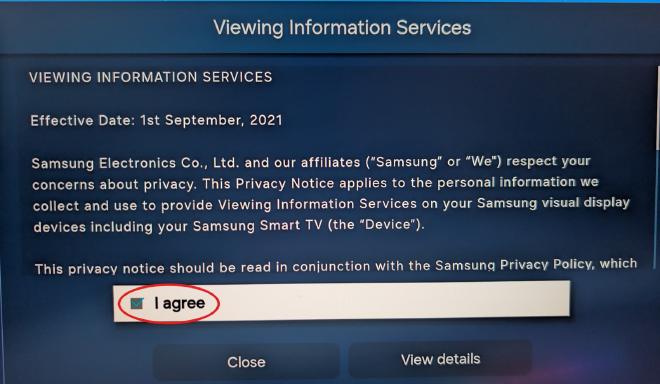
The good news: I run a pretty advanced network at home, so I’ve got the receipts for everything it did.
How Content Recognition Works #
What got the TVs in trouble is automatic content recognition, ACR. Samsung calls it Viewing Information Services. It samples what’s on your screen, your PC on a smart monitor or whatever’s on your TV, and sends a fingerprint of it to Samsung’s server. The server matches that against the shows and ads it has on file, and then you get ads for what you watched.
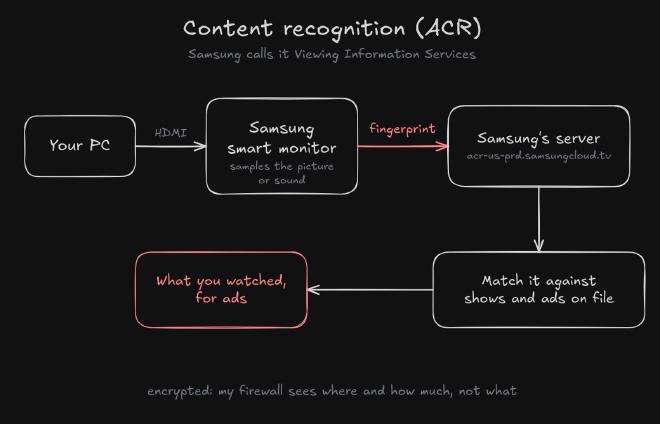
So for the most part, it isn’t screen recording you and sending it back. Texas alleges worse, which I’ll get to. But a fingerprint is still identifiable: if Samsung has a record of what’s on your screen, it knows what you’re watching. Samsung’s own FAQ says ACR matches signatures of the picture or sound and doesn’t record or watch your screen, though its Canadian notice does mention “video snippets”. Nobody outside Samsung has seen what’s actually sent.
It’s Not Just TVs #
Samsung’s Viewing Information Services notice (the Canadian one) covers displays “such as the Samsung Smart TV and Samsung Smart Monitor”. When mine boots, its notice says “your Samsung visual display devices including your Samsung Smart TV”. Same setup.
I’m not the first to catch one. RTINGS caught Samsung smart monitors, an Odyssey OLED G8 among them, talking to Samsung’s recognition servers the same way mine does. And it works over HDMI: a 2024 study found ACR running on Samsung and LG TVs even when they were only a screen for a laptop or a game console. LG’s smart monitors have their own version, Live Plus.
I wonder if smart monitors slip under people’s radar more than TVs do. If you’re like me, you don’t care about the smart part at all. I wish mine wasn’t a smart monitor. I use it as a dumb one and never think about it.
A Month of Firewall Logs #
My firewall runs OPNsense. Zenarmor logs every connection the monitor makes, and my DNS sinkhole, Unbound with a blocklist, logs every DNS lookup. On November 1, I exported everything they had on the monitor before it rotated out: Unbound keeps about a week, and Zenarmor about a month.
In one week, the monitor made 24,469 DNS lookups. That’s over 3,200 a day, from a monitor.
| Name it looked up (October 24 to November 1) | Lookups | My DNS filter |
|---|---|---|
nrdp.logs.netflix.com |
11,796 | blocked, every one |
acr-us-prd.samsungcloud.tv |
337 | allowed, every one |
log-config.samsungacr.com |
26 | blocked, every one |
acr-us-prd.samsungcloud.tv is the one that matters. Researchers identify it as Samsung’s content recognition server. In a month, my monitor connected to it 317 times and sent it about 17 megabytes.
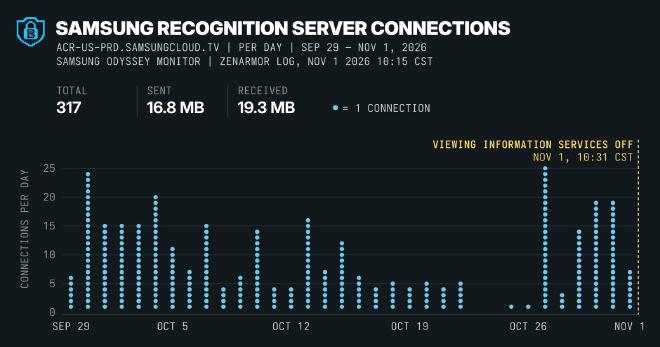
That’s 32 days with at least one connection and, while it was active, about one every twenty minutes, until I turned the setting off.
Why My Filters Missed It #
My blocklist did its job for the most part. It blocks a lot of what Samsung grabs, including all of samsungacr.com, which researchers also list as Samsung’s recognition system. It just doesn’t have this server: samsungcloud.tv isn’t on it.
Zenarmor saw every connection, but it filed them under the app “Samsung TV” (categories Technology and Computer, and Online Storage), not as ads, trackers or anything malicious. Nobody had this server labeled as a tracker, in Zenarmor’s database or in my sinkhole’s list, so it went straight through.
Everything Else It Talked To #
The recognition server wasn’t even the biggest. In that month, Zenarmor logged 79,614 connections from the monitor. About two-thirds were DNS lookups to my own firewall, asking where to find a server; the rest went out to more than 80 different servers, mostly Samsung, Amazon and Netflix. These are the ones it sent the most to:
| Server | What it is | Connections | Sent | Received |
|---|---|---|---|---|
unagi-na.amazon.com |
Amazon: Amazon lists it for metrics and reporting | 10,513 | 193.8 MB | 62.5 MB |
tvpnlinupepgpus.samsungcloud.tv |
Samsung TV; the name suggests Samsung TV Plus’s channel guide | 903 | 32.1 MB | 735.5 MB |
acr-us-prd.samsungcloud.tv |
Samsung’s content recognition server | 312 | 16.7 MB | 19.1 MB |
img-resize-cdn-prod.samsungnyc.com |
Samsung image delivery, likely menu artwork | 2,666 | 14.6 MB | 257.0 MB |
…minerva.devices.a2z.com |
Amazon; filter maintainers list it as device and app telemetry | 1,737 | 10.1 MB | 10.0 MB |
lcprd1.samsungcloudsolution.net |
Samsung; reported as a connectivity check | 2,724 | 8.1 MB | 5.4 MB |
osb-v2.samsungqbe.com |
Samsung platform services, likely Smart Hub and its apps | 1,603 | 5.8 MB | 48.9 MB |
nrdp.prod.ftl.netflix.com |
the Netflix app | 474 | 3.0 MB | 4.6 MB |
| Samsung Ads servers | Samsung’s ad servers | 681 | 159 KB | 0 (all blocked) |
“Sent” is what the monitor uploaded. These counts are from my first export, which ran to 7:33 a.m. on November 1; by my final export three hours later, the recognition server was up to the 317 above.
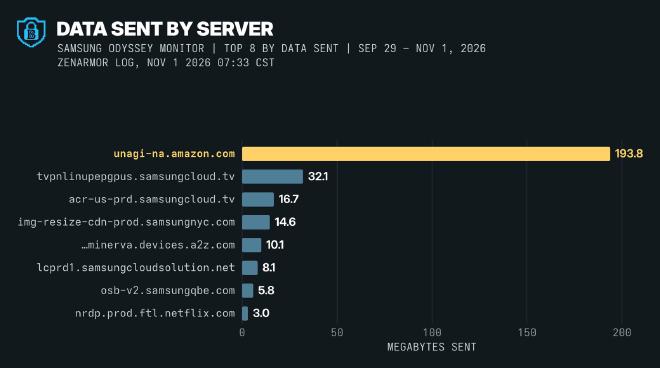
- Amazon, 194 MB. The biggest single upload went to Amazon’s metrics server. I don’t know whether that’s the built-in Prime Video app or Alexa or whatever. I don’t use any of those, and the logs don’t say which.
- Samsung Ads. Samsung’s own ad servers got contacted a ton too. Zenarmor blocked 681 of those.
- Netflix, almost 12,000 tries in a week. The Netflix app kept trying its logging server because my sinkhole kept blocking it. I don’t use the Netflix app either. Those are lookups, not reports: none of them got through.
This thing is disgusting.
Why It’s Worse Than a TV #
To me, this is way worse than a TV. I’m not banking or reading work messages on my smart TV, but I am on my monitor. It’s getting so much more about me than a TV ever would.
I trusted it. I brought it into my home and put it on my desk. It’s been spying on me this entire time. I only ever used it as a dumb monitor, and it didn’t matter. It’s still phoning home.
Is It Screenshotting My Work? #
Its traffic is encrypted, so I can’t see exactly what it sends. But I can see where it went and how much.
Texas alleged, in suing Samsung and four other TV makers, that their content recognition can capture screenshots of your TV every half second. In February 2026, Samsung reached an agreement with Texas to get Texans’ consent first.
If my monitor uploaded a 10 KB screenshot every half second, that would be 172,800 screenshots and about 1.7 gigabytes a day. Mine sent the recognition server 621 kilobytes on a typical day (the median of its 32 days; the busiest was 867 KB).
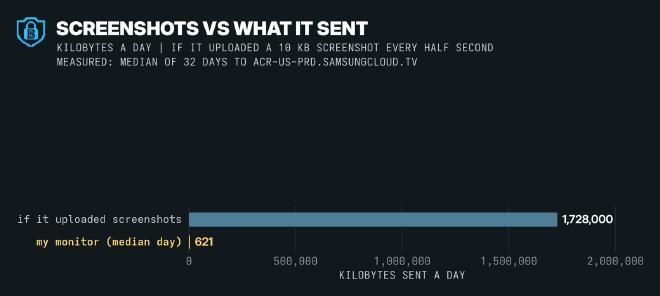
That’s more in line with fingerprints. But it’s still a fingerprint of my work chat and everything else on my screen. That’s not groovy.
One connection stood out. On October 31, a single connection to the recognition server stayed open for four hours, 10:32 a.m. to 2:37 p.m., while the monitor mostly showed one still page from my PC. It sent 197 KB. That could be fingerprints or just check-ins; the size alone can’t say.
Turn It Off #
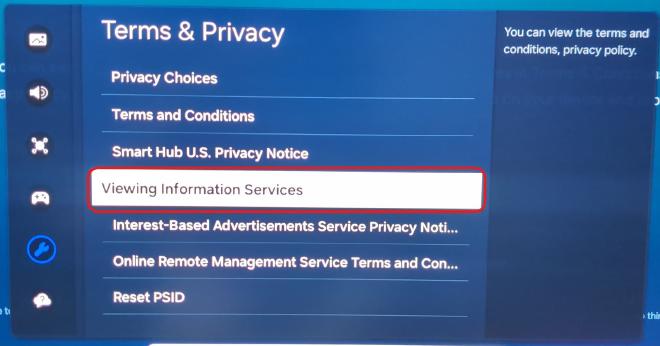
Here’s the setting on my G70B:
- Open Settings → All Settings → General & Privacy → Terms & Privacy.
- Select Viewing Information Services.
- Untick I agree, then Close.
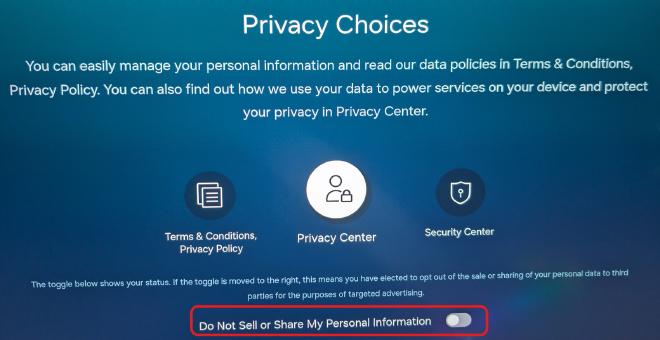
If you use the smart features, flip Do Not Sell or Share My Personal Information too:
- In Terms & Privacy, open Privacy Choices.
- Turn on Do Not Sell or Share My Personal Information. Mine was off.
Samsung moves these menus around between models and firmware, so yours may not be exactly here.
Did It Stop? #
What researchers saw. On RTINGS’s Odyssey, the traffic stopped or dropped sharply after the opt-out. New research from Northeastern found a Samsung smart TV that kept sending recognition-like traffic even after opting out, in 18 of 30 runs over HDMI and 41 of 60 on an antenna. Opting out fully worked on four of the platforms they tested: LG, Sony’s Google TV, Fire TV and VIDAA. So mileage may vary on how much Samsung actually cares about stopping it.
What I saw. Once I unticked it, my monitor never contacted that server again: not one connection or lookup in the two hours until I took it off the Wi-Fi. Everything else kept going.
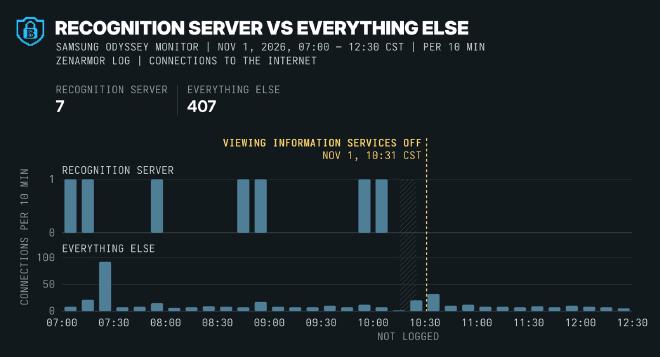
It’s not a full lab test, but that’s what I saw. Here’s how that day went, all times Central:
-
7:33 a.m.
First export
I pulled the monitor’s month from Zenarmor and its week from Unbound. -
10:15 a.m.
Final export
A second pull froze the month’s logs before anything rotated out. -
10:29 a.m.
Do Not Sell
The monitor sent my opt-out to Samsung Ads. My firewall blocked all six tries. The monitor told me it worked. -
10:31 a.m.
Viewing Information Services off
Unticked. The recognition server never heard from it again. -
12:33 p.m.
Wi-Fi off
I deleted the network. Its last lookup and last connection came seconds later. Then silence.
My Firewall Blocked My Opt-Out #
Funny note: my firewall blocked me opting out. Not the connection to the recognition server, mind you. The opt-out.
When I flipped Do Not Sell, the monitor sent the request to privacy-backend.samsungads.com. Zenarmor blocked it as Samsung Ads, all six tries, and nothing came back. The monitor still told me it worked:
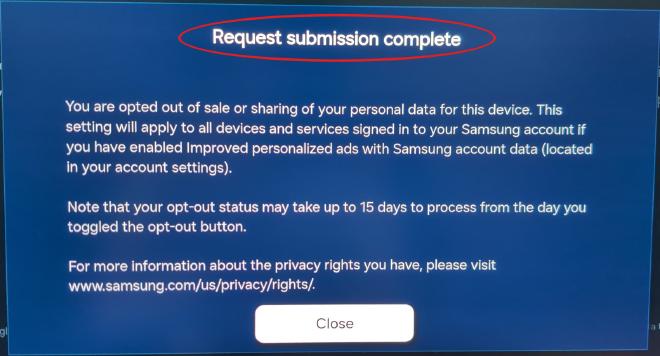
Samsung most likely never got my opt-out. If you block ad servers on your network, yours may not get through either.
What I Did: Cut It Off #
It’s a monitor. It doesn’t need the internet. I don’t use the apps, so it’s off my network now, and it’s not going back on. If some weird firmware update ever needs it, I’ll put it on for that and take it off again.
On mine, that’s Settings → All Settings → Connection → Network → Open Network Settings → Wireless → Manage Saved Networks: select the network, then Delete.
Off the network, it went silent. Its last lookup and its last connection were at 12:33:18, seconds after I deleted the network.
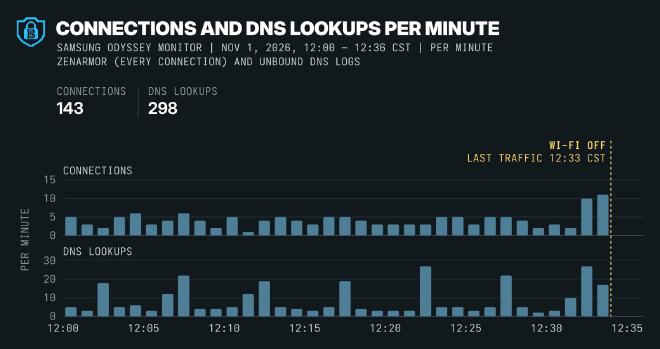
That’s what I recommend for most people: take your stuff off the internet. Your smart TV too, unless you use the apps. Ultimately, it’s safer to run something like a PC next to it.
Check Yours #
No homelab needed:
- Untick Viewing Information Services.
- If you use the apps, turn on Do Not Sell or Share.
- If you don’t, forget the Wi-Fi network and leave the Ethernet port empty.
If you run a DNS sinkhole (Pi-hole, AdGuard Home, Unbound with a blocklist):
- Search its query log for your monitor or TV and look for
samsungcloud.tv,samsungacr.comandsamsungads.com. - Add the recognition server to what you block, so it just doesn’t happen to you:
acr-us-prd.samsungcloud.tv
- If you also block ad servers, make sure your Do Not Sell request isn’t blocked. Mine went to
privacy-backend.samsungads.com. - My blocklist already had
samsungacr.com. The Northeastern researchers keep their full list of recognition servers for Samsung and the other platforms.
What My Logs Can’t Tell You #
- What it sent. It’s all encrypted. The firewall shows where and how much, not what.
- That this server is ACR. That’s the researchers’ identification, not Samsung’s.
- That a lookup is an upload. The Netflix app’s 11,796 lookups were all refused. And no lookups doesn’t mean no connections: a connection can stay open, or skip DNS.
- That it’s off for good. I watched for a couple of hours after the untick, on one model and one firmware, before taking it off the network.
It’s Off Now #
I know, I’m a little embarrassed that I let mine go on this long. I feel violated, but it’s off now. I’ve got it remediated, and I’m not gonna let it happen again.
If you’ve got a smart monitor that’s slipped under your radar, go check yours, or just cut it off.
Sources #
- Samsung: Viewing Information Services notice (Canada) and ACR FAQ
- RTINGS: smart TV and monitor tracking research, and TechRepublic on its monitor results
- Northeastern: Watching the Watchers and its blocklist
- ACR Tracking on Smart TVs, IMC 2024
- Texas Attorney General: the lawsuit (December 2025) and the Samsung agreement (February 2026)
- Amazon: WorkSpaces Secure Browser allowed domains, listing
unagi-na.amazon.com - LG: smart monitor user guide, Live Plus